Printer for small office Dubai
buyers face a tricky choice. You need a machine that prints, copies and scans well, but you also have limited desk space and a careful budget. A poor choice means slow queues, high toner bills and frequent breakdowns.This guide shares six proven tips to choose the right printer for small office Dubai teams can rely on. It also covers a
printer for clinics in Dubai, where reception desks and patient forms keep machines busy all day.

Table of contents
- What a printer for small office Dubai must do
- Tip 1: Choose a compact multifunction printer
- Tip 2: Decide on colour or black and white
- Tip 3: Match speed and size to your daily work
- Tip 4: Look for duplex and easy scanning
- Tip 5: Plan for clinics and front desks
- Tip 6: Check support, toner and rental options
- Know your running costs
- Common mistakes small offices make
- Quick buying checklist
- FAQs
What a Printer for Small Office Dubai Must Do
A small team usually shares one machine. It prints invoices, copies IDs and scans signed forms, often within the same hour.The best printer for small office Dubai users choose is simple to run, quick to respond and cheap enough to keep running. It should also fit on a desk or in a corner without crowding the room.
Tip 1: Choose a Compact Multifunction Printer
A
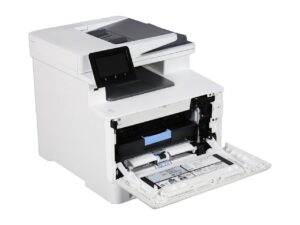
compact multifunction printer prints, copies and scans in one unit. That saves space and money compared with buying three separate devices.The HP Color LaserJet Pro MFP M477 is a good example. It offers colour printing, copying and scanning in a compact footprint, which makes it ideal for small offices. Our guide to
choosing the right photocopier explains how this compares with larger machines.
Tip 2: Decide on Colour or Black and White
Ask what your team really prints. Contracts and invoices need only black and white, while brochures and proposals look better in colour.A
colour laser printer for office use gives sharp text and strong graphics, and it keeps your documents looking professional. If colour pages are rare, set black and white as the default to control costs. Either way, the right printer for small office Dubai work should let you switch easily.
Tip 3: Match Speed and Size to Your Daily Work
Speed is measured in pages per minute (ppm). Small teams rarely need the fastest machine, but waiting in a queue wastes time.Think about paper size too. Many offices need A3 only a few times a year, yet that is when an A4-only machine lets you down.
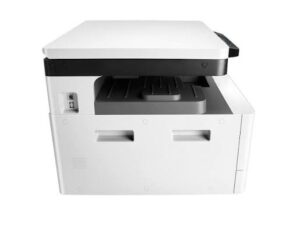
- The HP LaserJet MFP M442dn is an A3 monochrome machine with 24 ppm in A4 and 13 ppm in A3.
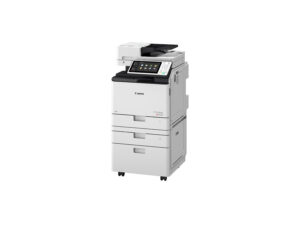
- The Canon imageRUNNER C256 is a compact A3 colour multifunction for front-office and admin work.
Tip 4: Look for Duplex and Easy Scanning
Automatic duplex printing uses both sides of the paper, so a printer for small office Dubai budgets should include it. It cuts paper use on every report and form.Scanning matters just as much. Scan to email or a shared folder keeps records tidy and reduces paper filing. To save more, read our tips on
how to reduce printing costs.
Tip 5: Plan for Clinics and Front Desks
A
printer for clinics Dubai providers use faces its own demands. Reception desks print appointment slips, consent forms and invoices all day.
- Choose a machine that handles bursts of small jobs quickly.
- Keep it near the front desk so staff do not walk far.
- Use scan to email for signed forms and reports.
Clinics also handle private information, so place the machine where patients cannot see printed pages. For official guidance on health services, visit the
Dubai Health Authority.
Tip 6: Check Support, Toner and Rental Options
Even a great machine needs toner and servicing. A small office cannot afford long delays.Choose a supplier that offers installation, technical support and quick access to toner and spare parts. Our guide to
photocopier toner shows how to plan supplies.If cash flow is tight, ask about rental or a refurbished machine. Alpha Care IT offers sale, purchase and rental, so you can compare options for your
small business printer UAE needs in one conversation.
Know Your Running Costs Before You Buy
The sticker price is only part of the story. Toner, paper and servicing decide what a machine really costs over several years.Ask for the page yield of each toner cartridge and the expected service needs. You can read how these devices work in this overview of a
multi-function printer. A thoughtful comparison helps you choose a printer for small office Dubai budgets can support.
Common Mistakes Small Offices Make
Many first-time buyers repeat the same errors when they shop for a printer for small office Dubai wide.
- Buying the cheapest machine and ignoring toner cost.
- Choosing A4 only, then needing A3 later.
- Skipping duplex and scanning.
- Forgetting support and spare parts.
A short chat about your real printing habits avoids most of these problems.
Quick Buying Checklist for a Printer for Small Office Dubai
- Pick a compact multifunction model.
- Decide on colour or black and white.
- Check speed and paper size.
- Confirm automatic duplex.
- Test scan to email.
- Ask about installation, toner and parts.
- Compare buy, refurbished and rental.
FAQs
What is the best printer for small office Dubai teams? A compact multifunction model with duplex and scanning suits most small offices.
Is a colour laser printer for office use worth it? Yes, if clients see your printouts. Otherwise a black and white model may be enough.
Can I rent a small business printer UAE wide? Yes. Alpha Care IT offers rental, sale and purchase across the UAE.
Find the Right Printer for Small Office Dubai with Alpha Care IT
Tell us how many people you have and what you print, and we will recommend a suitable machine along with installation and support.

 Printer for small office Dubai buyers face a tricky choice. You need a machine that prints, copies and scans well, but you also have limited desk space and a careful budget. A poor choice means slow queues, high toner bills and frequent breakdowns.This guide shares six proven tips to choose the right printer for small office Dubai teams can rely on. It also covers a printer for clinics in Dubai, where reception desks and patient forms keep machines busy all day.