
HP LaserJet Pro toner is easy to buy wrongly, because several cartridges look alike but fit different printers. A wrong order wastes money and delays your work. A right one keeps pages sharp and your office printing without a pause.
This guide explains HP LaserJet Pro toner for two popular mono families. We cover the HP LaserJet Pro 3003 and MFP 3103, and the HP LaserJet Pro 4003 and MFP 4103, plus six tips to order with confidence in Dubai and the UAE.
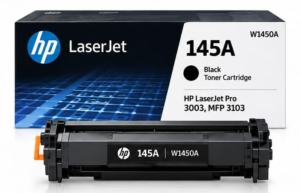
Table of contents
- Which HP LaserJet Pro toner fits which printer
- Tip 1: Match the cartridge to your exact model
- Tip 2: Understand the A and X versions
- Tip 3: Check the part number
- Tip 4: Confirm the exact UAE SKU
- Tip 5: Plan your stock
- Tip 6: Store toner correctly
- Common mistakes
- Quick buying checklist
- FAQs
Which HP LaserJet Pro Toner Fits Which Printer
The table below shows two black mono families from our catalogue. Always confirm the exact cartridge for your machine before you order.
| Printer | Toner | Part number | Colour |
|---|---|---|---|
| HP LaserJet Pro 3003 / MFP 3103 | HP 145A / 145X | W1450A / W1450X | Black |
| HP LaserJet Pro 4003 / MFP 4103 | HP 151A / 151X | W1510A / W1510X | Black |
These are mono machines, so you need only black toner. That keeps ordering simple compared with a colour printer, which needs four cartridges.
Tip 1: Match the Cartridge to Your Exact Model
A cartridge for a LaserJet Pro 3003 does not fit a LaserJet Pro 4003. The names look close, but the toner is different.
Check the model name on the front of your printer before you order. If you are unsure, send us a photo on WhatsApp and we will confirm the right HP 145A toner or HP 151A toner for you.
Tip 2: Understand the A and X Versions
Each family offers two versions, 145A and 145X, or 151A and 151X. In HP’s usual naming, the A version is the standard cartridge and the X version is a higher-yield one that is designed to print more pages.
The X version often costs more upfront, but it may lower the cost per page for busy offices. Ask us about page yield before you decide, because it depends on your model and print habits.
Tip 3: Check the Part Number
Part numbers remove doubt. The HP 145A toner is listed as W1450A, and the HP 145X as W1450X. The HP 151A is W1510A, and the HP 151X is W1510X.
When you ask for a quote, give us the printer model and the part number. This helps us confirm the correct HP W1450X or other cartridge quickly.
Tip 4: Confirm the Exact UAE SKU
Our own catalogue notes that every entry should be checked for the exact SKU before purchase. Regional codes can differ, and a cartridge sold in one country may not be the right one for another.
That is why we ask you to confirm before you buy HP LaserJet Pro toner. Alpha Care IT supplies toner and spare parts across the UAE, so message us with your model and we will confirm what suits your machine.
Tip 5: Plan Your Stock
Running out of toner in the middle of a busy day costs time and money. Keep one spare cartridge for each machine, and reorder when you open it.
Our guide to photocopier toner explains how to plan supplies, and our tips on how to reduce printing costs help you keep running costs low.
Tip 6: Store Toner Correctly
Good storage protects your investment. Follow these simple rules.
- Keep the cartridge in its box until you need it.
- Store it flat in a cool, dry place away from direct sun.
- Avoid hot rooms, which are common in Dubai summers.
- Do not stack heavy items on top.
You can read a simple overview of how toner works in this guide to toner in printing.
Common Mistakes
Many buyers repeat the same errors with HP LaserJet Pro toner.
- Ordering by guesswork instead of checking the model name.
- Mixing up 145A and 151A because the numbers look similar.
- Buying only on price and ignoring page yield.
- Forgetting to confirm the exact UAE SKU.
A label on your toner shelf, listing each machine and its cartridge, prevents most of these problems.
Quick Buying Checklist for HP LaserJet Pro Toner
- Read the model name on your printer.
- Match it to 145A/145X or 151A/151X.
- Check the part number.
- Choose standard or higher-yield.
- Confirm the exact UAE SKU with your supplier.
- Keep one spare cartridge.
- Store it flat in a cool, dry place.
For the manufacturer’s own product information, visit the HP website.
FAQs
Which HP LaserJet Pro toner fits the 3003 and MFP 3103? The catalogue lists HP 145A and 145X, part numbers W1450A and W1450X, in black.
Which toner fits the HP LaserJet Pro 4003 and MFP 4103? The catalogue lists HP 151A and 151X, part numbers W1510A and W1510X, in black.
Does Alpha Care IT guarantee stock of every cartridge? Stock can change, so message us with your model and we will confirm what is available.
Can I get installation and support too? Yes, Alpha Care IT provides installation across the UAE, technical support, and toner and spare parts.
Get HP LaserJet Pro Toner from Alpha Care IT
Send us your printer model and we will confirm the right cartridge and the exact UAE part number.
- WhatsApp: +971 55 757 2423
- Website: www.alphacareit.com
- Email: info@alphacareit.com