
Most offices look at the printer price and forget the running cost. The Epson WorkForce Pro ink cost per page is what really decides your budget over a year. This guide gives you six easy ways to keep that number low without hurting print quality.
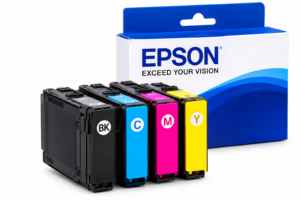
Table of contents
- Understand cost per page
- Pick the right capacity
- Print in draft for internal documents
- Print double-sided
- Fix settings that waste ink
- Order from a reliable supplier
Understand Cost Per Page
Cost per page is the cartridge price divided by the pages it prints. A cheap cartridge that runs out fast can cost more than a larger one. Always check the stated page yield on the product page, and compare it with your real monthly volume. Our article on printing cost for offices shows a simple worked example.Pick the Right Capacity
Epson WorkForce Pro printers use ink, not toner, and many models offer standard and higher-capacity cartridges. A higher-capacity cartridge usually lowers the cost per page for busy teams. If you print little, the standard size avoids ink sitting unused. Match the cartridge code to your printer model before you buy.Simple rule
- Heavy daily printing: high-capacity cartridge
- Light, occasional printing: standard cartridge
Print in Draft for Internal Documents
Set draft or economy mode for notes, drafts and internal checks. It uses less ink and prints faster. Keep the standard setting for client documents and invoices.Print Double-Sided
Double-sided printing saves paper, and it also makes you think before printing. Many WorkForce Pro models support automatic duplex, so turn it on as the default. This works well alongside a paperless office plan.Fix Settings That Waste Ink
Small settings add up. Remove full-page backgrounds, choose greyscale when colour is not needed, and avoid unnecessary cleaning cycles, because each one uses ink. Print a nozzle check only when you notice a problem. For how inkjet printing works, read this inkjet overview.Order From a Reliable Supplier
Ordering the wrong cartridge wastes both time and money. AlphaCare IT can confirm the cartridge code for your printer and tell you the stated yield, so you can compare cost per page honestly. Visit our homepage to see what else we supply.Quick Checklist
- Cartridge code matches the printer
- Yield compared with monthly pages
- Draft mode on for internal use
- Duplex printing turned on
- Greyscale used when possible