A3 monochrome printer buyers in Dubai often want one thing: dependable black and white output at a sensible cost. If your team prints contracts, invoices, reports and drawings, you may not need colour at all. A good A3 monochrome printer can handle all of that and save you money every month.
This guide gives six smart reasons to choose an A3 monochrome printer. It also shows what to check before you buy, so you pick the right machine for your office.
Table of contents
- What an A3 monochrome printer is
- Reason 1: Lower running costs
- Reason 2: Handles large documents
- Reason 3: Print, copy and scan in one
- Reason 4: Automatic duplex saves paper
- Reason 5: Simple and reliable
- Reason 6: Easy to connect
- Who should buy an A3 monochrome printer
- When colour is a better choice
- Quick buying checklist
- FAQs
What an A3 Monochrome Printer Is
An A3 monochrome printer prints in black and white on sheets up to A3, which is twice the size of A4. Many models are also multifunction machines, so they copy and scan too.
You may also see it called a black and white A3 printer or a monochrome laser printer. They all describe the same idea: fast, sharp text without the cost of colour toner.
Reason 1: Lower Running Costs
Colour pages usually cost more to run than black and white pages. If most of your work is text, a monochrome machine avoids paying for colour you never use.
Fewer toner types also means simpler supplies. Our guide on how to reduce printing costs explains more ways to keep your bills down.
Reason 2: Handles Large Documents
Some documents do not fit on A4. Spreadsheets, floor plans, schedules and posters often need A3.
An A3 monochrome printer lets you print these in one piece instead of taping pages together. It is also handy for notice boards, timetables and wide reports.
Reason 3: Print, Copy and Scan in One
An A3 multifunction printer replaces several devices. You print, copy and scan from the same unit, which saves desk space and money.
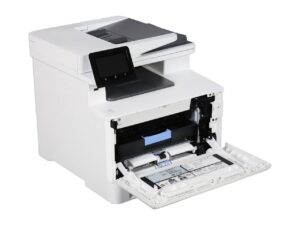
The HP LaserJet MFP M442dn is a good example. It is an A3 monochrome multifunction printer that prints at 24 ppm in A4 and 13 ppm in A3. That is enough speed for most small and mid-sized teams.
Reason 4: Automatic Duplex Saves Paper
Duplex printing uses both sides of a sheet. The HP LaserJet MFP M442dn includes auto duplex, so reports and forms use half the paper.
Over a year, that can add up. It is also kinder to the environment. Every A3 monochrome printer you consider should offer duplex.
Reason 5: Simple and Reliable
Monochrome machines have fewer parts to manage than colour machines. That often means simpler servicing and fewer things to go wrong.
Regular care still matters. You can read how regular photocopier maintenance improves office productivity in our related post.
Reason 6: Easy to Connect
Modern machines connect easily. The HP LaserJet MFP M442dn offers USB and Ethernet, so you can plug it into a computer or share it across your office network.
Ask your supplier to set it up with your team’s laptops and phones. A quick installation saves hours of frustration later. Alpha Care IT provides installation across the UAE.
Who Should Buy an A3 Monochrome Printer?
This type of machine suits law offices, accounting teams, trading companies, clinics and schools that print mostly text. It also suits engineering and construction offices that print wide drawings and schedules.
If your staff share one machine, a monochrome model keeps things simple. Everyone prints in black and white by default, and the budget stays predictable. Ask us to review your workload and we will tell you honestly whether you need colour.
When Colour Is a Better Choice
A monochrome machine is not right for everyone. If you print brochures, proposals or school posters often, a colour model may serve you better.
A middle path works for many offices. Keep a monochrome machine for daily work and use a colour machine for special jobs. You can read a simple overview of how these devices print in this guide to laser printing.
Questions to Ask Before You Buy an A3 Monochrome Printer
A few questions can save you from the wrong purchase.
- How many pages do we print each month?
- Do we really need A3, or only A4?
- Do we need copy and scan as well as print?
- Who will install it and provide support?
- Should we buy, rent or choose a refurbished model?
If you are unsure, tell us your monthly volume and we will suggest a suitable A3 monochrome printer.
Quick Buying Checklist
- Confirm A3 is truly needed.
- Choose a multifunction model if you copy and scan.
- Check speed in A4 and A3.
- Make sure automatic duplex is included.
- Check USB and Ethernet connections.
- Ask about toner and spare parts.
- Compare buy, rental and refurbished options.
For official guidance on doing business in the UAE, visit the UAE government portal.
FAQs
Is an A3 monochrome printer cheaper than a colour one? It usually costs less to run, because black and white pages are cheaper than colour pages.
Can an A3 monochrome printer also copy and scan? Yes, multifunction models such as the HP LaserJet MFP M442dn print, copy and scan.
Can I rent an A3 printer in Dubai? Yes. Alpha Care IT offers sale, purchase and rental.
Does Alpha Care IT supply toner and spare parts? Yes, we supply toner and spare parts along with installation and technical support.
Find Your A3 Monochrome Printer with Alpha Care IT
Tell us what you print each month and we will recommend the right machine, with installation and support.
- WhatsApp: +971 55 757 2423
- Website: www.alphacareit.com
- Email: info@alphacareit.com