
Fujifilm Apeos toner is harder to order than many people expect. The Apeos range covers many A3 colour and mono models, and the toner codes change between model groups. Some codes are also listed from overseas sources, so a careful check matters.
This guide explains Fujifilm Apeos toner in plain words. We cover the codes in our catalogue, the model groups they fit and six smart tips to order correctly in Dubai and across the UAE.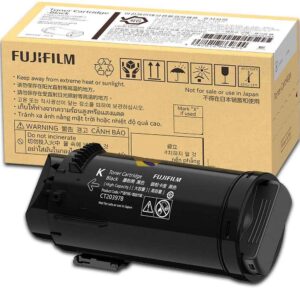
Table of contents
- Fujifilm Apeos toner at a glance
- Tip 1: Find your exact Apeos model
- Tip 2: Learn the CT code families
- Tip 3: Know the colour letters
- Tip 4: Watch for overseas codes
- Tip 5: Check models marked to confirm
- Tip 6: Always verify for the UAE
- Common mistakes
- Quick buying checklist
- FAQs
Fujifilm Apeos Toner at a Glance
This table comes from our catalogue. It shows what we know and what still needs confirming.| Apeos model group | Toner reference | Notes |
|---|---|---|
| A3 colour C2060 / C2560 / C3060 | CT203939 family | CT203939 reported as black; UAE supplier code, verify |
| A3 colour C2061 / C2561 / C3061 | CT204249 to CT204252 | K/C/M/Y; overseas codes, verify UAE |
| A3 colour C2567 / C3067 / C3567 | CT204249 to CT204252 | K/C/M/Y; overseas codes, verify UAE |
| A3 colour C3530 / C4030 | Model-specific | To confirm |
| A3 colour C3570 / C4570 / C5570 / C6570 / C7070 | Model-specific | To confirm |
| Mono 2560 / 3060 / 3560 / 4570 / 5570 | Model-specific | To confirm |
| Mono 4830 / 5330, ApeosPrint 5330 | Model-specific | To confirm |
Tip 1: Find Your Exact Apeos Model
Apeos names look alike, and one digit can change the toner. An Apeos C2560 and an Apeos C2567 may need different codes.Read the full model name on the front of the machine before you order Fujifilm Apeos toner. If you are unsure, send us a photo on WhatsApp and we will help you read it.Tip 2: Learn the CT Code Families
Fujifilm toner uses CT codes. The Fujifilm CT203939 family is listed for the Apeos C2060, C2560 and C3060. The Fujifilm CT204249 to CT204252 range is listed for the C2061, C2561, C3061, C2567, C3067 and C3567.A code family means several cartridges share a pattern. You must still choose the right colour inside the family. Our guide to photocopier toner explains how to plan this.Tip 3: Know the Colour Letters
Colour machines use four toners: black (K), cyan (C), magenta (M) and yellow (Y). For the CT204249 to CT204252 range, the catalogue lists the four cartridges as K, C, M and Y.For CT203939, our catalogue reports the black cartridge only, so you must confirm the other colours with your supplier. An A3 colour toner set is only complete when all four are correct. You can read how the process works in this overview of laser printing.Tip 4: Watch for Overseas Codes
Some entries in our catalogue come from overseas listings. The CT204249 to CT204252 range is marked as overseas codes, so the UAE code may differ.This is a good reason never to buy by code alone. Send us your model, and we will confirm the correct Fujifilm Apeos toner for the UAE before you pay.Tip 5: Check Models Marked To Confirm
Several groups, including the Apeos C3530, C4030 and C3570 to C7070, and the mono Apeos models, are listed as model-specific and still to confirm.This simply means we do not want to guess. If you own one of these machines, message us with the model and we will check the right toner. Alpha Care IT supplies toner and spare parts across the UAE.Tip 6: Always Verify for the UAE
Our catalogue says entries are references, not proof of UAE stock. That is an honest note, and it protects you from ordering the wrong cartridge.Before you buy, ask for written confirmation of the exact code, the colour and the compatibility with your model. Our tips on how to reduce printing costs also help you use toner wisely.Common Mistakes
Buyers often make these errors with Fujifilm Apeos toner.- Mixing up the C2560 and C2567 codes.
- Ordering one colour and forgetting the other three.
- Trusting an overseas code without checking the UAE one.
- Skipping written confirmation.
Quick Buying Checklist for Fujifilm Apeos Toner
- Read the full model name.
- Match it to its CT code family.
- Choose the right colour or the full set.
- Check whether the code is overseas or UAE.
- Ask for compatibility in writing.
- Keep one spare of your most used colour.
- Store toner flat in a cool, dry place.
FAQs
Which toner fits the Apeos C2560? Our catalogue lists the CT203939 family for the C2060, C2560 and C3060. Confirm the colour and the UAE code with us.Which toner fits the Apeos C2567 and C3567? The catalogue lists CT204249 to CT204252, but marks them as overseas codes to verify for the UAE.Do you have codes for every Apeos model? Not yet. Some models are marked to confirm, so send us your model and we will check.Can Alpha Care IT also install and support my machine? Yes, we provide installation across the UAE, technical support, and toner and spare parts.Order Fujifilm Apeos Toner with Alpha Care IT
Tell us your Apeos model and we will confirm the right toner and the UAE code before you order.- WhatsApp: +971 55 757 2423
- Website: www.alphacareit.com
- Email: info@alphacareit.com