
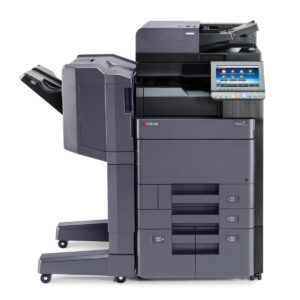
Photocopier installation is the step many buyers forget to plan, yet it decides how smoothly your new machine starts. A good installation means the right spot, the right connections and a trained team. A rushed one means delays, errors and frustrated staff.
This guide gives a simple seven-step checklist for photocopier installation in a Dubai office, school or clinic. Follow it and your machine will be ready to work from day one.
Table of contents
- Why photocopier installation matters
- Step 1: Choose the right spot
- Step 2: Plan delivery and access
- Step 3: Check power and space
- Step 4: Connect to your network
- Step 5: Set up scanning and defaults
- Step 6: Train your staff
- Step 7: Test and sign off
- Common mistakes
- Quick checklist
- FAQs
Why Photocopier Installation Matters
A photocopier is a large, shared machine. If it is placed badly or connected incorrectly, everyone feels the problem every day.
Proper photocopier installation also protects the machine. A stable, ventilated spot and correct setup help it run well for years. Our post on how regular photocopier maintenance improves office productivity explains what comes next.
Step 1: Choose the Right Spot
Pick a location that is easy for everyone to reach but does not block walkways. Leave space around the machine for paper trays, covers and service access.
Avoid damp corners and direct sunlight. A cool, clear area is better for the machine and for your staff.
Step 2: Plan Delivery and Access
Floor-standing machines are heavy and large. Measure doors, lifts and corridors before photocopier delivery in Dubai day.
Tell building management about the delivery time if needed. Alpha Care IT provides installation across the UAE, so ask us to plan the delivery with you.
Step 3: Check Power and Space
Check the manual or ask your supplier about the power connection the machine needs. Use a proper wall socket and avoid overloaded extension leads.
Also leave room for ventilation. Good airflow helps the machine stay cool during busy hours.
Step 4: Connect to Your Network
Most offices share one machine across many computers. This is where network printer setup matters.
The machine usually connects through Ethernet or the office network, and your team installs the driver on their laptops. Some models, such as the HP LaserJet MFP M442dn, offer USB and Ethernet. You can read about the technology in this overview of Ethernet.
Ask your technician to test printing from a few different computers and phones during photocopier installation.
Step 5: Set Up Scanning and Defaults
This step saves money for years. Set the machine to print double-sided and in black and white by default, with colour only when needed.
Also set up scan to email or a shared folder. Our tips on how to reduce printing costs explain why defaults matter.
Step 6: Train Your Staff
Staff training for a photocopier does not need to be long. Show people how to load paper, clear a small jam, copy, scan and print.
A short session and a one-page guide near the machine work well. Our guide on choosing the right photocopier can also help your team understand what the machine can do.
Step 7: Test and Sign Off
Before the technician leaves, test everything. Print from several devices, copy, scan to email and print on both sides.
Check that you know who to call for support, toner and spare parts. Alpha Care IT provides technical support, toner and spare parts, so you have one contact for it all.
Common Mistakes
Many offices repeat the same errors during photocopier installation.
- Placing the machine where it blocks a corridor.
- Not measuring doors and lifts before delivery.
- Skipping network tests on phones and laptops.
- Forgetting to train new staff.
Quick Checklist for Photocopier Installation
- Choose an open, ventilated spot.
- Measure doors, lifts and corridors.
- Confirm power and space.
- Connect and test the network.
- Set duplex and scan defaults.
- Train your staff.
- Test and sign off with your technician.
For official information about doing business in the UAE, see the UAE government portal.
FAQs
How long does photocopier installation take? It depends on the model and your network, so ask your supplier for a time estimate.
Does Alpha Care IT install machines across the UAE? Yes, we provide installation across the UAE.
Do you also train staff? We can show your team the basics during setup. Ask us when you book.
Can I rent a photocopier and get installation too? Yes. Alpha Care IT offers sale, purchase and rental with support.
Book Your Photocopier Installation with Alpha Care IT
Tell us your office layout and the model you chose, and we will plan a smooth installation.
- WhatsApp: +971 55 757 2423
- Website: www.alphacareit.com
- Email: info@alphacareit.com